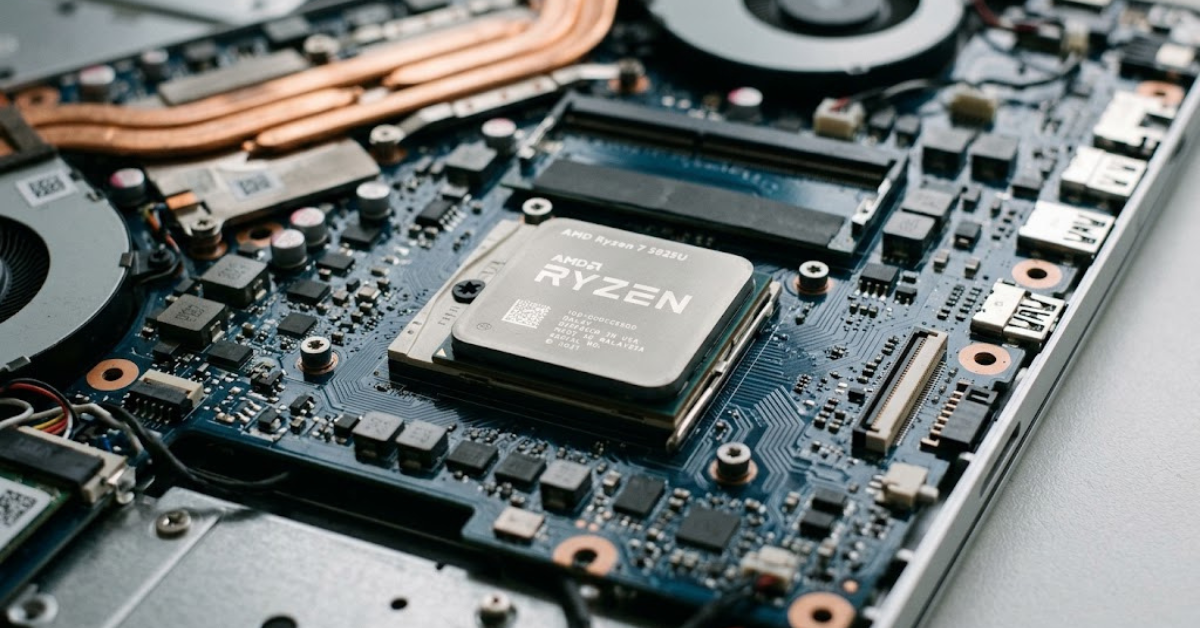
Shopping for a laptop can get confusing when two models look almost identical but promise very different levels of performance. If you’ve come across the Ryzen 7 5825U, you’re looking at an eight-core AMD laptop processor designed to balance everyday speed, multitasking, and power efficiency.
Released as part of AMD’s Ryzen 5000 mobile processor family, the Ryzen 7 5825U is commonly found in thin-and-light laptops built for work, study, entertainment, and general productivity. It isn’t the newest processor on the market, but its combination of eight CPU cores and integrated Radeon graphics can still make it a useful option, depending on the laptop’s price, memory configuration, cooling system, and condition.
So, is the Ryzen 7 5825U still worth buying? Let’s look at its specifications, real-world performance, gaming capabilities, power consumption, and the things you should check before choosing a laptop with this chip.
What Is the AMD Ryzen 7 5825U?
The AMD Ryzen 7 5825U is a mobile processor designed primarily for laptops. It belongs to AMD’s Ryzen 5000 Series and uses the Zen 3 CPU architecture, which was developed to deliver strong processing performance without requiring the power and cooling capacity of a large desktop system.
The letter “U” in its name identifies it as a low-power mobile processor class. That makes it particularly suitable for laptops where battery life, portability, and manageable heat output matter alongside performance.
The Ryzen 7 5825U is not a dedicated graphics card or a complete computer. It’s the processor that handles calculations, application instructions, and other CPU tasks, while its integrated graphics can render visuals without requiring a separate GPU.
You can find the official specifications on AMD’s Ryzen 7 5825U product page.
AMD Ryzen 7 5825U Specifications
Here are the key specifications to know before comparing laptops.
| Specification | AMD Ryzen 7 5825U |
| Processor family | Ryzen 5000 Series |
| CPU architecture | Zen 3 |
| Manufacturing process | TSMC 7nm FinFET |
| CPU cores | 8 |
| CPU threads | 16 |
| Base clock | 2.0 GHz |
| Maximum boost clock | Up to 4.5 GHz |
| L2 cache | 4 MB |
| L3 cache | 16 MB |
| Default TDP | 15W |
| Configurable TDP | 10–25W |
| Integrated graphics | AMD Radeon Graphics |
| Graphics cores | 8 |
| Maximum graphics frequency | Up to 2,000 MHz |
| CPU socket/platform | Mobile, FP6 |
Specifications are based on AMD’s published product information. Actual operating speeds and performance depend on laptop design, cooling, power settings, and workload.
What Do These Specifications Mean?
The numbers tell only part of the story. Here’s how they translate into everyday use.
Eight cores and 16 threads: The processor can handle multiple workloads efficiently, making it suitable for having a browser, office applications, messaging tools, and other programs open simultaneously.
Boost clock up to 4.5 GHz: The processor can increase its operating frequency when conditions allow. It won’t necessarily run at this speed continuously, particularly during demanding tasks or when the laptop reaches its power or temperature limits.
15W default TDP: This is a low-power processor class designed for mobile computers. The actual power supplied to the chip can vary with the laptop manufacturer’s settings and AMD’s configurable power range.
Integrated Radeon graphics: You can use the laptop for video playback, everyday visual tasks, and some gaming without a separate graphics card. Performance depends heavily on system memory and the particular laptop design.
Ryzen 7 5825U Performance: What Can It Handle?
The Ryzen 7 5825U’s biggest advantage is its combination of multi-core processing power and relatively low power consumption. With eight cores and 16 threads, it can manage demanding everyday workloads better than many older or entry-level laptop processors.
In practice, performance depends on the laptop’s cooling system, power limits, memory configuration, and software. Independent testing of the HP Envy x360 15 with this processor found strong multi-core performance, illustrating that the chip can handle more than basic office work. Results from one laptop, however, should not be treated as a guarantee for every model. <Cite refs={[“turn411181search1”]}/>
Everyday Tasks and Office Work
For everyday computing, the Ryzen 7 5825U is more than capable. It is well suited to:
- Browsing with multiple tabs open.
- Working in Microsoft Office or Google Workspace.
- Attending video meetings while running other applications.
- Streaming videos and listening to music.
- Managing documents, spreadsheets, and presentations.
- Running typical business and educational software.
For these tasks, the processor is unlikely to be the main limitation in a reasonably configured laptop. Having enough RAM and a fast SSD can make just as much difference to how responsive the computer feels.
Programming and Development
The Ryzen 7 5825U can also be a sensible choice for software development. Its eight cores and 16 threads are useful for compiling code, running development tools, managing local databases, and working with multiple applications.
It can handle many web development workflows, programming environments, and moderate virtual-machine workloads. However, if your work involves several large virtual machines, heavy Android emulation, or extensive containerized services, prioritize 32GB of RAM or more when the laptop supports it.
The processor also supports AMD-V virtualization technology, which helps enable compatible virtualization software. The experience still depends on memory capacity, storage speed, and the hypervisor you choose. <Cite refs={[“turn411181search0”]}/>
Photo Editing and Video Editing
For light to moderate creative work, the Ryzen 7 5825U is a capable option. It can handle basic photo adjustments, graphic design, short video projects, and routine editing tasks in compatible applications.
There are limits, though. High-resolution video projects, complex effects, extensive color grading, and demanding 3D workflows may benefit from a more powerful processor and a dedicated graphics card.
If creative work is your main priority, check the complete laptop specifications rather than buying based on the processor name alone. A high-quality display, sufficient memory, fast storage, and appropriate graphics hardware can be just as important.
Is the Ryzen 7 5825U Good for Gaming?
Yes, for casual gaming and selected less-demanding titles—but it is not a dedicated gaming processor with a powerful standalone GPU.
The Ryzen 7 5825U includes integrated AMD Radeon graphics with eight graphics cores and a maximum graphics frequency of up to 2,000 MHz. These graphics share system memory rather than having a dedicated pool of video memory like most discrete graphics cards. <Cite refs={[“turn411181search0″,”turn411181search3”]}/>
That makes the laptop suitable for some lightweight games, older titles, and selected competitive games with adjusted graphics settings. More demanding modern games can be a challenge, especially at higher resolutions.
What Types of Games Can It Run?
Your experience will vary by game, resolution, RAM configuration, graphics settings, and cooling.
| Game category | Expected experience |
| Lightweight indie games | Generally a good fit |
| Older PC games | Often playable with suitable settings |
| Less-demanding competitive games | Potentially playable at reduced settings |
| Modern AAA games | Frequently limited by integrated graphics |
| Demanding ray-traced games | Not a suitable target for this integrated GPU |
These are broad expectations, not guaranteed frame rates. Check benchmarks for the exact game and, ideally, the same laptop model you intend to buy.
Why RAM Matters for Gaming
Integrated graphics use system RAM to store graphics data. That means memory configuration can have a noticeable effect on gaming performance.
For a Ryzen 7 5825U laptop, consider these points:
- 16GB RAM: A practical starting point for general use and casual gaming.
- Dual-channel memory: Can improve integrated graphics performance by increasing available memory bandwidth.
- 32GB RAM: Useful for heavier multitasking, development, and some creative workloads, although it does not automatically make every game faster.
- Upgradeable memory: Worth checking before buying, since some thin laptops have soldered RAM that cannot be replaced.
If gaming is your main goal, a laptop with a dedicated graphics card will generally be a better choice for demanding modern titles.
Ryzen 7 5825U Power Consumption and Battery Life
The Ryzen 7 5825U has a default TDP of 15W and a configurable TDP range of 10–25W. This low-power design is intended for portable computers, where balancing performance with heat and battery use matters. <Cite refs={[“turn411181search0”]}/>
However, TDP should not be confused with the laptop’s total electricity consumption or a direct measurement of battery life. The display, battery capacity, cooling system, wireless connections, and background applications all affect how long a laptop lasts away from a charger.
A laptop with this processor may offer good battery life, but two models using the same chip can produce very different results.
Before buying, look for independent battery tests of the exact model. Pay attention to whether the tests involve light web browsing, video playback, or heavier workloads, since each produces a different result.
Ryzen 7 5825U vs. Ryzen 7 5700U
The Ryzen 7 5825U and Ryzen 7 5700U are both eight-core, 16-thread laptop processors, but they use different generations of AMD’s Zen architecture.
The Ryzen 7 5825U uses Zen 3, while the Ryzen 7 5700U uses Zen 2. The newer architecture can provide better CPU performance, although the size of the difference depends on the workload and laptop implementation.
| Feature | Ryzen 7 5825U | Ryzen 7 5700U |
| CPU architecture | Zen 3 | Zen 2 |
| CPU cores | 8 | 8 |
| Threads | 16 | 16 |
| Maximum boost clock | Up to 4.5 GHz | Up to 4.3 GHz |
| Default TDP | 15W | 15W |
| Integrated graphics | Radeon Graphics | Radeon Graphics |
The 5825U is generally the more attractive option when prices and laptop quality are comparable. However, don’t automatically reject a laptop with the 5700U: a better display, larger battery, stronger build quality, or significantly lower price may make it the better overall purchase.
Ryzen 7 5825U vs. Ryzen 7 5800U
The Ryzen 7 5825U and Ryzen 7 5800U are closely related processors. Both have eight cores and 16 threads, use the Zen 3 architecture, and target power-efficient laptop designs.
The 5825U is a later Barcelo refresh, while the 5800U belongs to the original Cezanne generation. Their headline specifications are similar, so real-world differences may be modest in some workloads.
If you are comparing laptops with these processors, focus on the complete system rather than expecting a major performance jump based on the CPU name alone. Cooling, memory speed, sustained power limits, and the laptop’s price can matter more than a small specification difference.
Ryzen 7 5825U vs. Intel Core i7 Laptop Processors
The Ryzen 7 5825U competes with several Intel Core i5 and Core i7 mobile processors, but comparisons depend on the exact model and generation.
For example, Notebookcheck’s testing of a Ryzen 7 5825U laptop found multi-core performance comparable to some 12th-generation Intel Core i7 P-series results in its benchmark set. That does not mean every Core i7 laptop is slower: Intel’s product range includes processors with substantially different power limits and performance characteristics. <Cite refs={[“turn411181search1”]}/>
When comparing an AMD laptop with an Intel alternative, consider:
- CPU performance: Compare benchmarks for the exact processors and laptop models.
- Integrated graphics: Some Intel processors have different graphics capabilities, while certain laptop configurations include dedicated GPUs.
- Battery life: Look at independent tests rather than relying only on processor specifications.
- Ports and connectivity: Features such as Thunderbolt depend on the specific laptop platform and configuration.
- Price and warranty: A discounted, well-built laptop can offer better value than a faster model that costs substantially more.
The best choice depends on what you do most often and how much you are willing to spend.
What to Check Before Buying a Ryzen 7 5825U Laptop
A processor is only one part of a laptop. If you’re considering a used or refurbished model, or buying a budget laptop built around the Ryzen 7 5825U, check the following details carefully.
1. RAM Capacity and Upgrade Options
Aim for at least 16GB of RAM if you regularly multitask, develop software, or play games. If your workload involves virtual machines or heavier creative applications, 32GB may be worthwhile.
Confirm whether the RAM is upgradeable. Some laptops solder the memory to the motherboard, limiting future expansion.
2. SSD Capacity
A solid-state drive helps applications launch quickly and makes the overall system feel responsive. A 512GB SSD is a practical starting point for many users, while 1TB is useful if you store large projects, games, or media files.
Also check whether the laptop supports SSD upgrades and whether it uses a standard M.2 drive.
3. Display Quality
Don’t overlook the screen. Check resolution, brightness, viewing angles, color coverage, and refresh rate.
For office work, a comfortable Full HD display may be sufficient. For photography, design, or video editing, color accuracy and brightness deserve more attention.
4. Battery Health and Cooling
For a used laptop, examine battery health and look for signs of overheating. A dusty cooling system or worn battery can undermine the advantages of a power-efficient processor.
If possible, test the laptop under load and listen for unusual fan noise. Check for unexpected shutdowns, severe performance drops, or other signs of hardware trouble.
5. Price Compared With Newer Models
Because the Ryzen 7 5825U launched in January 2022, it belongs to an older generation of mobile processors. That doesn’t make it obsolete, but it does make pricing especially important. <Cite refs={[“turn411181search0”]}/>
Compare it with newer laptops in the same price range. A newer chip may offer better integrated graphics, improved efficiency, or other platform features, while an older model may still be an excellent value if discounted appropriately.
6. Warranty and After-Sales Support
Check the warranty period, repair options, keyboard layout, available ports, and replacement-part availability. These details matter more than small benchmark differences when you plan to use the laptop for several years.
Who Should Buy a Ryzen 7 5825U Laptop?
The Ryzen 7 5825U remains a reasonable choice for several types of users.
Good fit for:
- Students who need a laptop for research, writing, and online classes.
- Office workers who use spreadsheets, documents, browsers, and video meetings.
- Programmers who run common development tools and moderate workloads.
- Home users who want responsive everyday performance.
- Casual gamers who understand the limits of integrated graphics.
Less suitable for:
- Gamers who want high frame rates in demanding AAA games.
- Professionals who rely on heavy GPU-accelerated rendering or complex 3D workloads.
- Users who need the latest platform features and the strongest possible performance.
- Buyers whose work requires specialized hardware or extensive sustained processing power.
For these users, a laptop with a stronger processor, dedicated graphics, or a newer platform may be a better investment.
Frequently Asked Questions
Is the Ryzen 7 5825U still good in 2026?
Yes, it can still be a capable processor for everyday computing, office work, programming, and moderate multitasking. Whether it’s worth buying in 2026 depends on the laptop’s price, condition, memory, battery health, and how it compares with newer alternatives.
Is the Ryzen 7 5825U better than an Intel Core i5?
It depends on which Intel Core i5 you mean. Performance varies significantly across generations and power classes, so compare the exact processor models and laptop benchmarks before deciding.
Does the Ryzen 7 5825U have integrated graphics?
Yes. It includes integrated AMD Radeon graphics with eight graphics cores and a maximum frequency of up to 2,000 MHz. It is suitable for everyday visuals and some gaming, but it is not equivalent to a powerful dedicated graphics card.
Can the Ryzen 7 5825U run Windows 11?
Yes. AMD lists Windows 11 64-bit among the supported operating systems for the processor. Actual compatibility also depends on the laptop’s complete hardware configuration, firmware, and drivers. <Cite refs={[“turn411181search0”]}/>
Is the Ryzen 7 5825U good for programming?
Yes. Its eight cores and 16 threads make it suitable for many programming tasks, including web development, software compilation, and running development environments. More memory may be necessary for large projects, multiple virtual machines, or demanding workloads.
Does the Ryzen 7 5825U support overclocking?
AMD lists the Ryzen 7 5825U as not unlocked for overclocking. Its performance is managed through the processor’s boost technology and the laptop manufacturer’s power and thermal settings. <Cite refs={[“turn411181search0”]}/>
How much RAM should a Ryzen 7 5825U laptop have?
For most users, 16GB is a sensible target. Consider 32GB for heavier development, multitasking, virtual machines, or creative work. Check the laptop’s memory configuration and upgrade limits before buying.
Is the Ryzen 7 5825U good for video editing?
It can handle basic and moderate video-editing projects, but demanding effects, high-resolution footage, and complex timelines may benefit from a stronger processor and dedicated graphics. Software support, memory, cooling, and the laptop’s overall configuration also matter.
Conclusion
The Ryzen 7 5825U offers a useful combination of eight CPU cores, 16 threads, integrated Radeon graphics, and a low-power design. It remains a capable option for everyday productivity, study, programming, and light creative work, while casual gaming is possible with realistic expectations and suitable settings.
Its main limitations are its older platform and integrated graphics, which can struggle with demanding modern games and intensive GPU workloads. Before buying, compare the complete laptop configuration, check independent performance and battery tests, and make sure the price reflects its age.
If you find a Ryzen 7 5825U laptop at a competitive price with sufficient RAM, a good SSD, a quality display, and healthy battery life, it may still offer excellent value. The smartest purchase is not necessarily the laptop with the biggest processor number—it’s the one that best matches your needs and budget.